Today I’d like to share another left over from the SDX Talk I mentioned earlier: Basically some screenshots from Visual Studio 2010 Architecture Edition (VSArch from now on). Don’t expect something fancy if you already know VSArch, I just couldn’t find all that much information on the Web beyond the two screenshots on the Microsoft site.
The main new things within VSArch include the Architecture Explorer, UML Support, and the Layer Diagram.
Architecture Explorer
Note: To make the following more tangible I loaded a sample project I use regularly as test harness and took respective screenshots while I analyzed it. Click the images for a larger view…
The Architecture Explorer is about getting a better view into existing code. Whether you join a project that is under way, whether you have lost control over your code, or whether you just need to spice up your documentation. Architecture Explorer helps you by visualizing your solution artifacts and dependencies. Artifacts include the classical code artifacts (classes, interfaces, etc.), as well as whole assemblies, files, and namespaces.
Architecture Explorer lets you select those artifacts, display graphs with dependencies, and even navigate along those dependencies and in and out of detail levels.
The following screenshot shows VSArch. The docked pane on the bottom contains the Architecture Explorer that acts as “navigation and control center”. This is where you select your artifacts and visualizations. It could certainly use some improvement from a usability perspective, but it does the job anyway.

The screenshot shows two different visualizations of the assembly dependencies in my solution, a matrix view and a directed graph. Just to stress the fact: This was generated out of the solution, by analyzing the project dependencies.
The next screenshot shows a mixture of various artifacts, including classes, interfaces, even files, across parts of or the whole solution.

Depending on what filters you set, this graph could give you a high level overview of certain artifacts and their dependencies. For example you could easily spot hot spots, like the one class your whole system depends upon. Or make sure the dependencies are nicely managed via interfaces and find undue relationships. Even spot unreferenced and therefore dead graphs.
Once you go one level deeper, you may want to cluster the artifacts by some category.
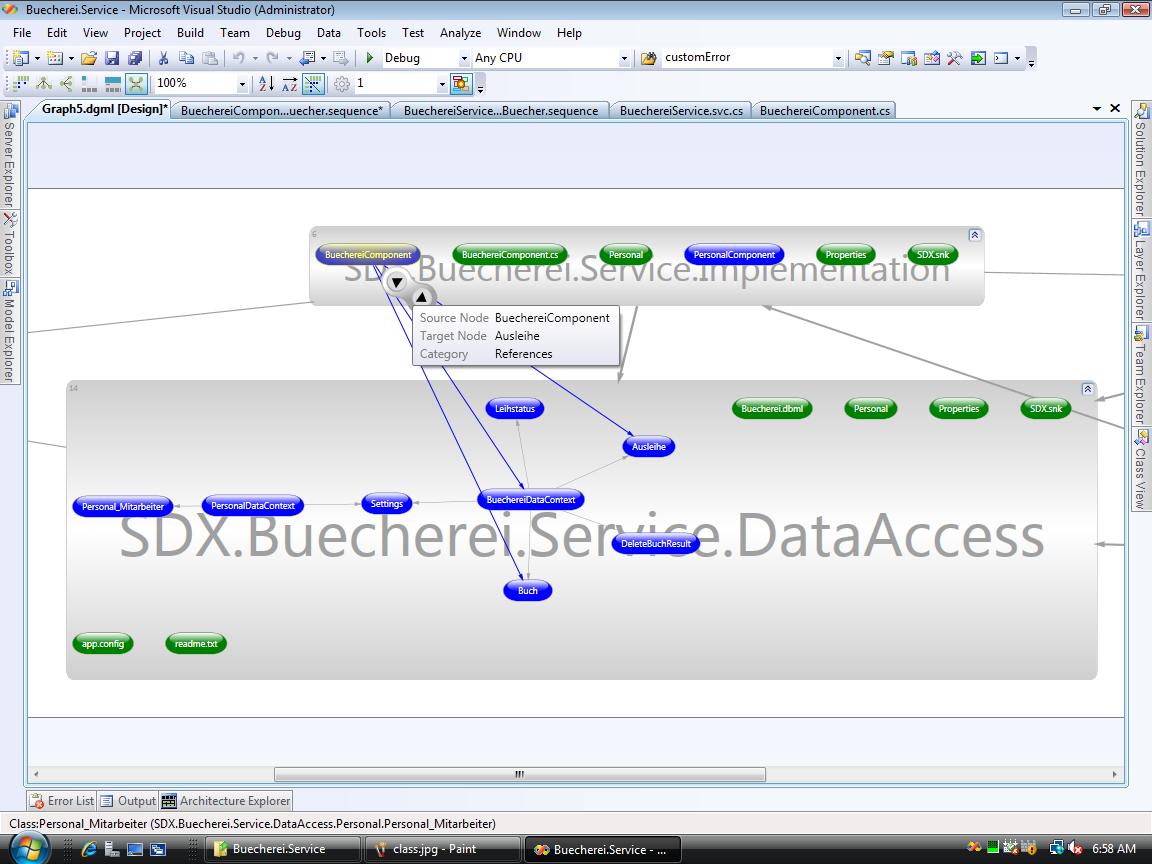
The image shows again artifacts and their dependencies, but this time grouped by the project to which they belong. It also shows what kind of relationship a line represents and lets you navigate along that dependency.
The Architecture Explorer should help getting a better understanding of your code. It helps you to detect code smells or may guide your refactoring.
UML Support
Yes, UML like in, well UML. Not extensively, but it includes activity diagram, component diagram, (logical) class diagram, sequence diagram, and use case diagram. I didn’t spend much time investigating them, just drew some diagrams in order to take the screen shots. Generally I can say that Microsoft can draw boxes and lines (big surprise here) but there is a lingering feeling that those diagram editors may not be finished yet (again, hardly surprising on a CTP).
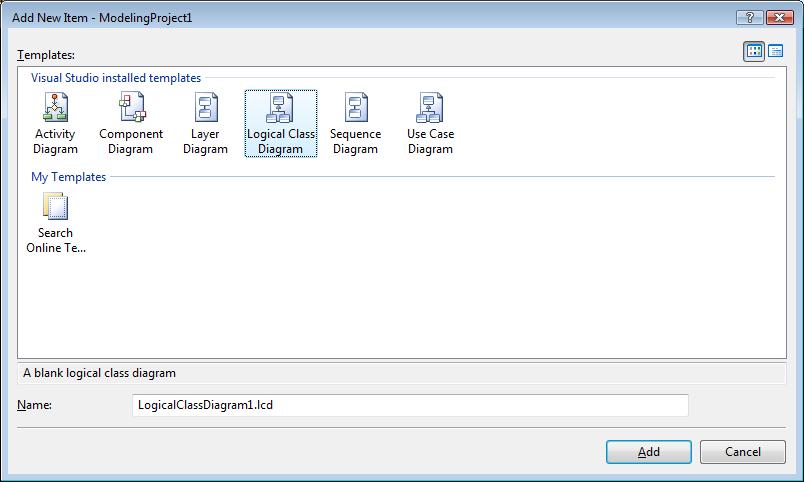
Creating a new diagram is easy enough. Just create a new project of type “Modeling Project” and add an item:
Everything starts with a use case, so here is our use case diagram:

One can draw the diagram as he likes. As you can see from the context menu, there is something being worked on. Namely the “Link to Artifacts” entry shows the Architecture Explorer, yet I couldn’t quite figure out what’s behind this. Also note the validate entries which didn’t do very much, but we’ll see them later in the Layer Diagram.
Next on the list is activity diagrams:

Works as expected, no surprises, no hidden gems that I’ve found.
The same is true for the component diagram:

Just a diagram, no surprises.
The logical class diagram gets more interesting:

As you can see, it contains very .NETy stuff like enumerations. It also has these menu entries that hint on more to come in the future — right now the selected menu entry brings up the error message asking for a stereotype, yet I didn’t even find a way to set those. Also the editor may still need some work, e.g. one cannot drag classes in and out of packages.
As a side note: The relation between this logical class diagram and the already existing class diagram escapes me. At least they are a little redundant.
Next on the list is the sequence diagram. Rather than drawing one myself I reverse engineered the existing code:

Quite nice and again, used this way it can help you documenting or just plain understanding existing code.
Note: If you want to try that yourself, the CTP has a bug: You need to have a modeling project and at least one diagram before the menu entry “Generate Sequence Diagram” appears. And while you will be presented with a dialog asking what call depth to analyze, it usually works only for one level.
Layer Diagram.
Now for the most dreadfully looking diagram (though Microsoft has a more colorful one on its site…): Some boring connected blocks, meant to represent the layers of your architecture.
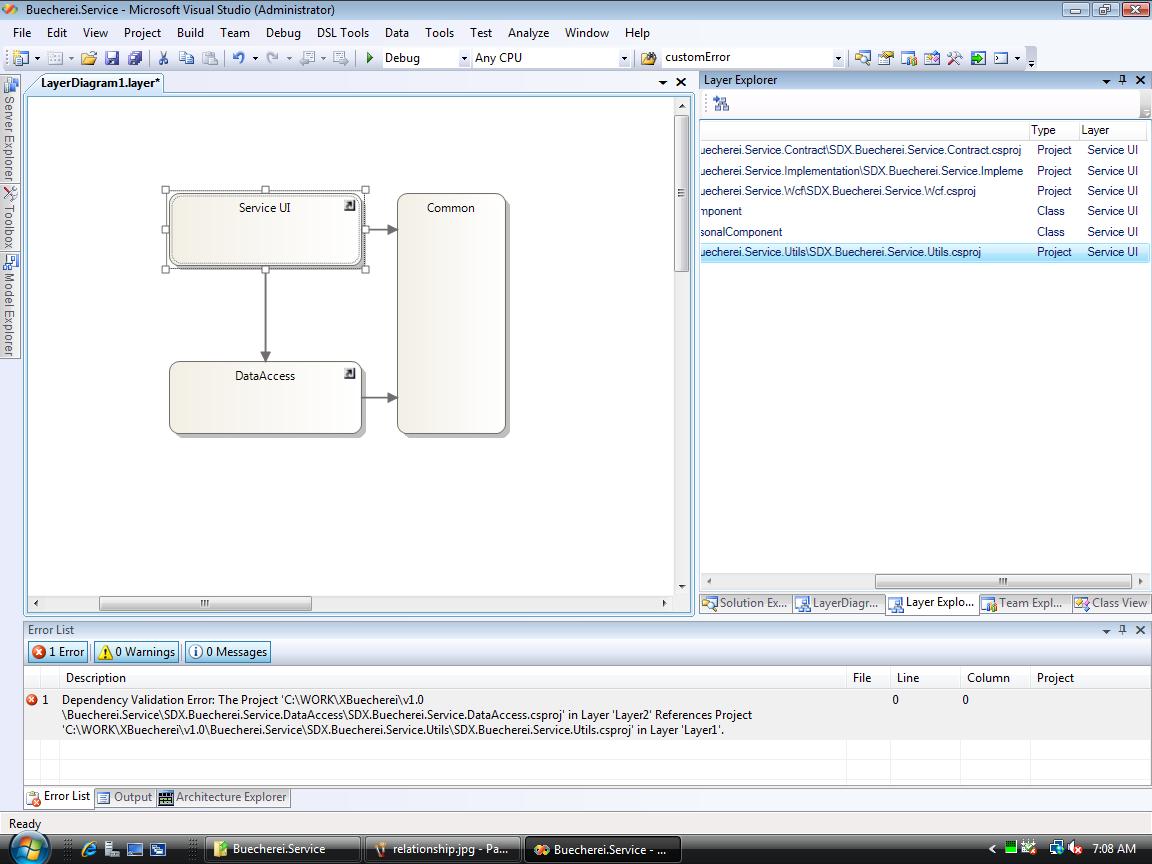
Actually this is one of the most interesting features for any architect and dev lead: It’s a living beast! 👿
You can add assemblies as well as other artifacts to the bleak boxes. Afterwards you can actually validate whether the dependencies between those artifacts match or violate the dependencies implied by the diagram. In the screenshot you can see that I deliberately misplaced an assembly and consequently got a respective error. Using this feature an architect can ensure that all layer related architectural decisions are honored during development.
To conclude…
The Architecture Explorer is certainly a worthwhile feature and I also like the validation feature of the Layer Diagram. That’s certainly something new and not to be found in other products.
Generating sequence diagrams is nice but it remains to be seen whether this will allow roundtrip engineering. The logical class diagram doesn’t yet meet my expectations and it’s not quite clear to me how it will evolve. The other diagrams? Well, they just work. However in this group is nothing exciting for you if you already have another modeling tool like Enterprise Architect (no advertising intended, just happens to be the one I’ve used recently…). And a dedicated tool probably will provide a more complete UML coverage. UML 2.0 has 13 types of diagrams, including state diagrams, which is in my opinion the biggest gap in VSArch UML support.
Anyway, if that caught your attention and your interested in more details there are two options: One, download the CTP and try for yourself. Two, if you want it more condensed and avoid the hassle with a VPC, watch a video with VSArch at work. For that there are two links I can provide:
- Peter Provost’s talk at the PDC. Go to the timeline on the PDC site, search for TL15 and you should find “TL15 Architecture without Big Design Up Front”, which is about VSArch, despite the title. His talk was the role model for my analysis of VSArch, yet seeing it live could still give better insights.
- Visual Studio Team System 2010 Week on Channel 9 has a bunch of videos, especially the “Architecture Day” ones. “top down” and “bottom up” show VSArch at work.
The final question however will be if all those features are compelling enough to actually buy the … Visual Studio Team Suite (i.e. the “you get everything” package). Why not the Architecture Edition? Well, if you are a developer as well as an architect, the Architecture Edition lacks too much in the other areas. Given that there is usually quite a monetary gap between dev edition and team suite, that gap might very well be used to buy a 3rd party UML tool instead… .
That’s all for now folks,
AJ.NET


 AJ's blog
Looking forward the VS2010 RTM!
Comment by Jack — March 30, 2009 @ 11:20 am
The first stuff (screenshots) looks like Ndepend graphical reports! Am I right?! Are they going to put in within the IDE?! that would be cool
Comment by Muhammad Mosa — March 30, 2009 @ 2:06 pm
@Muhammad: There’s probably a limit to the ways to present those dependencies in a meaningful way, so it’s no surprise they look alike.
Anyway, NDepend goes certainly a step further in providing queries into your model, e.g. have a look at http://jachman.wordpress.com/2009/03/18/code-analysis-tool-visualndepend-at-a-glance/
Comment by ajdotnet — March 30, 2009 @ 2:21 pm
[…] Visual Studio 2010 Architecture Edition (Alexander Jung) […]
Pingback by Dew Drop - March 30, 2009 | Alvin Ashcraft's Morning Dew — March 30, 2009 @ 3:46 pm
[…] Visual Studio 2010 Visual Studio 2010 Architecture Edition […]
Pingback by Links For March 30 2009 | .Net — March 30, 2009 @ 3:47 pm
[…] Visual Studio 2010 Architecture Edition Today I’d like to share another left over from the SDX Talk I mentioned earlier: Basically some screenshots from […] […]
Pingback by Top Posts « WordPress.com — March 31, 2009 @ 2:46 am
It looks cool, good to see such more and more stuff part of single VS.NET ide.
Comment by Ali — March 31, 2009 @ 2:18 pm
Well the test edition almost seems to have more added value compared to the architecture edition. For senior devs you usually would need the Team Suite, sad but true.
In both cases: you certainly can buy Pro edition plus TFS and add almost any feature with free/cheaper tools (Selenium, Enterprise Architect) or better tools (NDepend, Typemock). Team editions trumps in terms of integration of the features, but with a bit of effort you can get almost the same (or better) value. At least if you are fluent with MSBuild and PowerShell:-)
I wonder when they buy JetBrains to get Resharper and take the best Java IDE off the market, but I guess these products are just way too fabulous for Microsoft’s portfolio.
Comment by museumofmisfits — April 20, 2009 @ 10:45 pm
Very nice. Thanks for the thorough writeup.
Michael
Comment by Michael Kennedy — April 23, 2009 @ 9:54 pm
Nice post…
Comment by Jones — April 29, 2009 @ 7:40 pm
Architecture Edition is a new bundle? I see that these features are included in the Ultimate edition please clarify. Thank you
Comment by Ryan Jumawan — May 21, 2010 @ 4:18 am
@Ryan: You’re correct. Microsoft has changed the packaging scheme for VS2010. You can find details on http://www.microsoft.com/visualstudio/en-us/products
Comment by ajdotnet — May 21, 2010 @ 6:52 am
You can safely forget about the Architecture feature. This is only included in the Ultimate edition for 12KUSD 😦
Professional and Premium editions don’t have it.
Comment by Balint Nagy — January 15, 2011 @ 3:52 pm
[…] project on visual studio 2010???? this article is an interesting overview of what you can do! https://ajdotnet.wordpress.com/2009/03/29/visual-studio-2010-architecture-edition/ personally I think that Microsoft released a good tool to have a better Software Governance and […]
Pingback by Visual studio 2010 Architecture Edition « steliodibello — August 22, 2011 @ 11:51 pm
Hi and thanks for a very nice writeup:)
I have a question for you which is very much related to this topic. I’m about to embark on a *very* ambitious vendor on “reverse engineering” a major, in-house developed, system and would like to use a tool for this purpose. I’ve been using EA (Enterprise Architect) in my previous modelling endevours and like the tool. As you know they have a “VS-plugin” and I wonder what you think about this plug-in in comparison to the tools available in the VS Ultimate Edition as the cost of this edition is, well, substantial:)
Many thanks in advance
/Peter
Comment by Peter Litsegård — December 5, 2011 @ 11:06 am
@Peter: I haven’t used EA for reverse engineering, only for design. And frankly, I doubt that it is up to the job.
I have been asked for a review of http://www.ndepend.com/ some time ago. (I have refrained from doiing this, though only because it didn’t feel right. I was apparently not the only one asked, given the number ob blog posts regarding this topic. Clever marketing though ;-)).
Anyway, NDepend has a good reputation, and it goes beyond what VS or EA can do for you in terms of getting a grip on existing code. And it certainly has a different price tag.
Comment by ajdotnet — December 8, 2011 @ 1:19 pm
Thanks for your reply on my entry although I got a little bit carried away while posting it replacing “endeavor” with “vendor” 🙂
Now, it is interesting that you mention NDepend as I downloaded it (yesterday actually). Although it looks promising in terms of providing facilities such as dependency graphs and dependency matrices et.c.. The problem, from my point of view, is that it is not the tools which are the solution, rather it is the process of *how* to best embark on a journey like this – tools are merely hmmm, well, just tools albeit VERY useful. I’m currently looking at reverse engineering a *major* in-house built solution with very little gathered architectual documentation – most of what exists resides in documentation which lags miserably compared to the code-base that exist now. It would be great if there were any best practices of good documents “out there” which could act as very good departures for this journey…
A quick note on EA though – I think EA would be a great container for the artifacts that are discovered in the process mentioned above though. what do you say?
Cheers
/Peter
Comment by Peter Litsegård — December 8, 2011 @ 1:44 pm
>The problem, from my point of view, is that it is not the tools which are the solution, rather it is the process of *how* to best embark on a journey like this
I couldn’t agree more!
Also the situation you describe is sounds very familiar. (Actually, I’m just enganged in an architecture review for a customer’s application.)
>very little gathered architectual documentation – most of what exists resides in documentation which lags miserably compared to the code-base that exist now.
My approach to architecture reviews usually follows this receipt:
– Look for system and application architecture documentation. More often than not the result is not sufficient. If so…
– Look at the directory structure, solution structure, namespaces, etc.. If the dev team has had some architecture in mind, it should become apparent.
– Also I try to follow the control flow of an incomming web request down to the database and back, kind of the first steps for a code review, to deducde the dependencies between layers (if they exist) and components. It also helps me understanding how some of the dynamic aspects of architecture are addressed (transactions, security, error handling, …).
At this point I usually have a fair understanding about the principal architecture and patterns.
Tools like architecture explorer (probably NDepend as well) usually burry this “conceptual understanding” under to many details. They come into play at later stages, when I need to verify or quantify my findings, and when I know in which direction to point them (views and filters). When it comes to code, respective analysis tools (e.g. code metrics) play a similar role.
>I think EA would be a great container for the artifacts that are discovered
It would. So would Visio or any other tool you can use to document your findings or the target design. This is important, but it is also very static. Architecture Explorer or NDepend in my opinion serve a different purpose: They can be applied to the actual code base. In this respect they are like BI reporting over your code, drilling down into different aspects and differnet levels of abstraction. And they do this not only in the initial (analysis) phase, but also during refactoring. In that situation, they act somewhat like regression tests for architectural changes.
>if there were any best practices
Regarding best practices, I would look for some information regarding “green field” and “brown field” development: http://en.wikipedia.org/wiki/Brownfield_(software_development)
A collegue of mine called the following book a “must read for every developer”: http://www.amazon.com/Brownfield-Application-Development-Donald-Belcham/dp/1933988711/ref=sr_1_6?ie=UTF8&qid=1323369808&sr=8-6
HIH.
Comment by ajdotnet — December 8, 2011 @ 8:59 pm
[…] but should be getting closer to Enterprise Architect and save much pain! There is a nice run down here, again I’ll use some hands on sessions to get myself acquainted with […]
Pingback by Euro Tech·Ed Time 2009 | Maps Per Second — July 6, 2013 @ 6:34 pm